Source and runtime profiles
Configure where a resource comes from and how it runs.
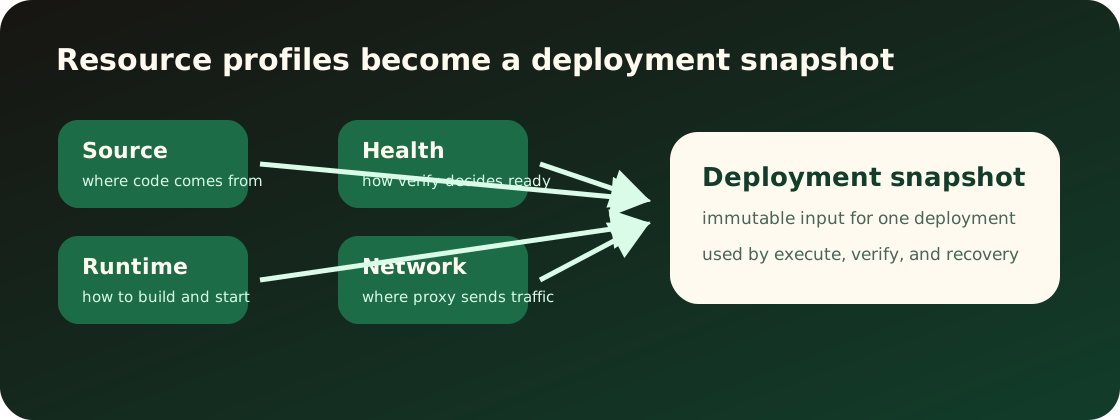
The source profile tells Appaloft where to read the application from. It belongs to the resource, not to one temporary deployment request.
Existing entrypoints should cover:
- Local folder or current workspace source.
- Git repository, ref, and base directory.
- Source snapshot provided by automation.
- Image, static site, or Compose source summaries.
After source profile changes, new deployments read the new source. Completed and running deployments keep their own deployment snapshots. Saving the source profile does not pull source, create a deployment, or restart the current runtime.
The runtime profile describes how Appaloft should run the resource. It includes install, build, start, static output, container naming intent, and runtime strategy.
Users should be able to configure or observe:
- Install and build commands.
- Start command or image entrypoint.
- Static site publish directory.
- Runtime strategy, such as auto, Docker/OCI, or static publishing.
- The expected listener port, confirmed in the network profile.
During deployment, Appaloft combines source and runtime profiles into a runtime plan. The plan should explain what will run instead of exposing internal structures.
Saving the runtime profile is a durable resource profile edit. It only changes planning input for future deployments. It does not edit historical deployment snapshots or immediately restart, rename, or replace a running workload.
If source and runtime settings clearly conflict, users should see actionable correction guidance before deployment.
Common mismatches:
- Static site without a publish directory.
- Git repository with no detectable build evidence and no runtime profile.
- Image source combined with source build commands.
- Application listener port does not match the network profile.
Profile drift means the resource's saved profile, the profile in an entry config file, or the profile captured by the latest deployment snapshot no longer match. It often appears after an existing resource is changed through repository config, a GitHub Action, CLI flags, or the Web console.
When you inspect resource detail, Appaloft can return sectioned diagnostics that show the affected section and field, whether the mismatch blocks deployment, and which explicit resource command should fix it. The default config deploy workflow stops before deployment when it detects existing-resource drift; the deploy command does not silently update the resource profile.
To resolve it:
- Run
appaloft resource show <resource-id> --jsonand read the diagnostics. - If diagnostics point at source, runtime, network, health, or access, run the matching
appaloft resource configure-source,configure-runtime,configure-network,configure-health, orconfigure-accesscommand. - If diagnostics point at configuration, use
appaloft resource set-variableorunset-variablefor the resource-level override. - Deploy again after updating the profile. Historical deployment snapshots are not edited.
Secret and configuration values must stay masked in diagnostics, errors, logs, and support payloads. Use keys, scope, exposure, references, and suggested commands while troubleshooting; do not copy raw secret values.
For repeated config deploys, source fingerprint links remember which project, environment,
resource, and optional server a repository source should reuse. Use appaloft source-links list or
show to inspect that safe mapping, relink to retarget it intentionally, and delete to remove
the mapping without deleting the resource or deployment history.
The Web console should show source/runtime profile in resource creation and resource configuration screens with field-level help.
The CLI should map resources create, resources configure-source, and resources configure-runtime arguments to the same concepts. Interactive prompts may ask for missing fields, but they should not rename the concept.
The HTTP API should reuse resource configuration schemas and avoid transport-only source/runtime shapes.
After configuration, inspect resource details for the source/runtime summary. The next deployment writes these profiles into its deployment snapshot, while old deployment details keep the values captured at the time. If deployment fails, detect failures usually point to source, while plan failures usually point to source/runtime/profile mismatch.
CLI examples:
appaloft resource configure-source res_web \
  --kind git-repository \
  --locator https://github.com/example/web \
  --git-ref main \
--base-directory apps/webappaloft resource configure-runtime res_web \
--strategy static \
--build-command "bun run build" \
--publish-directory distHTTP API example:
POST /api/resources/res_web/runtime-profile
Content-Type: application/json

{
  "strategy": "static",
  "buildCommand": "bun run build",
  "publishDirectory": "dist"
}