Source and runtime profiles
配置资源来源和运行方式。
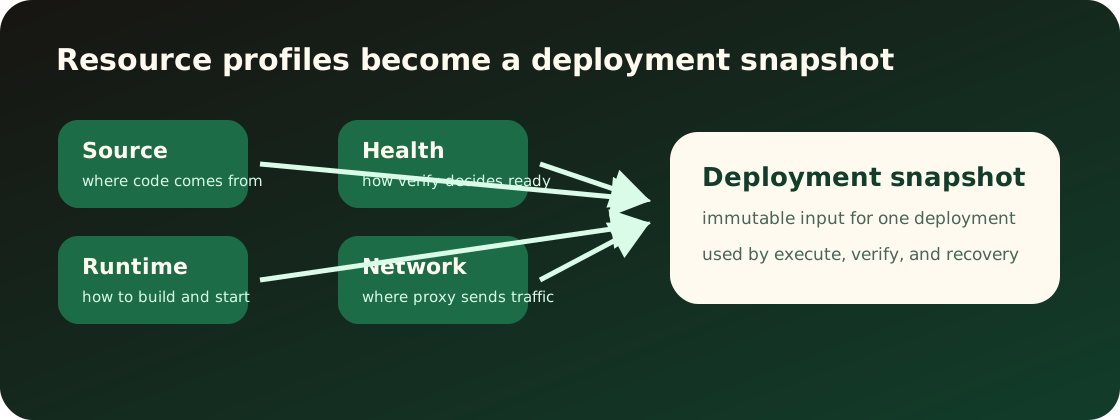
Source profile 告诉 Appaloft 从哪里读取应用。它属于资源,而不是某一次部署的临时参数。
已有入口应支持这些常见输入:
- 本地目录或当前工作区 source。
- Git repository、ref 和 base directory。
- 自动化环境提供的源码快照。
- 镜像、静态站点或 Compose 相关来源摘要。
Source profile 改变后,新的部署会读取新来源。已经完成或正在执行的部署继续使用自己的部署快照。保存 source profile 不会拉取源码、创建部署或重启当前运行时。
Runtime profile 描述 Appaloft 应该如何运行资源。它包含安装、构建、启动、静态输出目录、容器命名意图和运行策略。
用户能配置或观察的重点:
- 安装命令和构建命令。
- 启动命令或镜像入口。
- 静态站点 publish directory。
- 运行时策略,例如 auto、Docker/OCI 或静态发布。
- 运行进程预期监听的端口会在 network profile 中确认。
部署时,Appaloft 会把 source profile 和 runtime profile 一起转成运行计划。计划应解释将执行什么,而不是只显示不可读的内部结构。
保存 runtime profile 是一次 durable resource profile edit。它只改变后续部署使用的规划输入,不会修改历史 deployment snapshot,也不会立即重启、重命名或替换正在运行的 workload。
如果来源和运行策略明显冲突,用户应在部署前看到可执行的修正建议。
常见不匹配:
- 静态站点没有 publish directory。
- Git 仓库没有可识别的构建线索,且 runtime profile 为空。
- 镜像来源却配置了源码构建命令。
- 应用实际监听端口和 network profile 不一致。
Profile drift 表示资源当前保存的 profile、入口配置文件里的 profile,或最近一次部署快照里的 profile 不一致。它通常发生在资源已经存在后,又从 repository config、GitHub Action、CLI 参数或 Web console 中修改了 source、runtime、network、health、access 或配置项。
查看资源详情时,Appaloft 可以返回 sectioned diagnostics,说明哪个 section 和字段不一致、是否会阻止部署,以及建议运行哪个显式资源命令。默认的 config deploy 流程在发现 existing-resource drift 时会先停止,不会把部署命令当作 profile 更新命令。
处理方式:
- 先运行
appaloft resource show <resource-id> --json查看 diagnostics。 - 如果 diagnostics 指向 source、runtime、network、health 或 access,运行对应的
appaloft resource configure-source、configure-runtime、configure-network、configure-health或configure-access。 - 如果 diagnostics 指向配置项,使用
appaloft resource set-variable或unset-variable处理资源级覆盖。 - 更新 profile 后重新运行部署。历史部署快照不会被修改。
Secret 和配置值在 diagnostics、错误、日志和支持信息中必须保持 masked。排查时只依赖 key、scope、exposure、reference 或 suggested command,不复制 raw secret value。
重复执行 config deploy 时,source fingerprint link 会记录某个 repository source 应复用哪个
project、environment、resource,以及可选 server。使用 appaloft source-links list 或 show
查看这个安全映射;使用 relink 显式 retarget;使用 delete 只移除映射,不删除资源或部署历史。
Web console 应在资源创建和资源配置页展示 source/runtime profile,并用 ? 解释字段含义。
CLI 应把 resources create、resources configure-source、resources configure-runtime 的参数映射到同一套概念。交互式 CLI 可以询问缺失字段,但不能用另一个名字表示相同输入。
HTTP API 应复用资源配置 schema,不应定义 transport-only 的 source/runtime 字段。
配置后可以通过资源详情确认 source/runtime profile 摘要。下一次部署会把这些 profile 写入部署快照;旧部署详情里的 snapshot 仍保持当时捕获的值。部署失败时先看失败阶段:detect 多半是 source 问题,plan 多半是 source/runtime/profile 匹配问题。
CLI 示例:
appaloft resource configure-source res_web \
  --kind git-repository \
  --locator https://github.com/example/web \
  --git-ref main \
--base-directory apps/webappaloft resource configure-runtime res_web \
--strategy static \
--build-command "bun run build" \
--publish-directory distHTTP API 示例:
POST /api/resources/res_web/runtime-profile
Content-Type: application/json

{
  "strategy": "static",
  "buildCommand": "bun run build",
  "publishDirectory": "dist"
}